







Crunchyroll is one of the leading streaming platforms for anime fans, offering a large selection of series, movies, simulcasts, dubbed content, and other entertainment. While watching Crunchyroll on a phone or computer is relatively simple, signing in on a smart TV, streaming device, or gaming console can sometimes be less convenient because entering an email address and password with a remote or controller takes time. This is where the Crunchyroll Activate process becomes useful.
Crunchyroll provides an activation-code method that allows users to connect a compatible device to their Crunchyroll account. Instead of typing complete account credentials on the television, users can display an activation code on their device and enter that code from a phone or computer. The process is designed to connect the device with the user’s account in only a few steps.
Quick Answer: How Does Crunchyroll Activate Work?
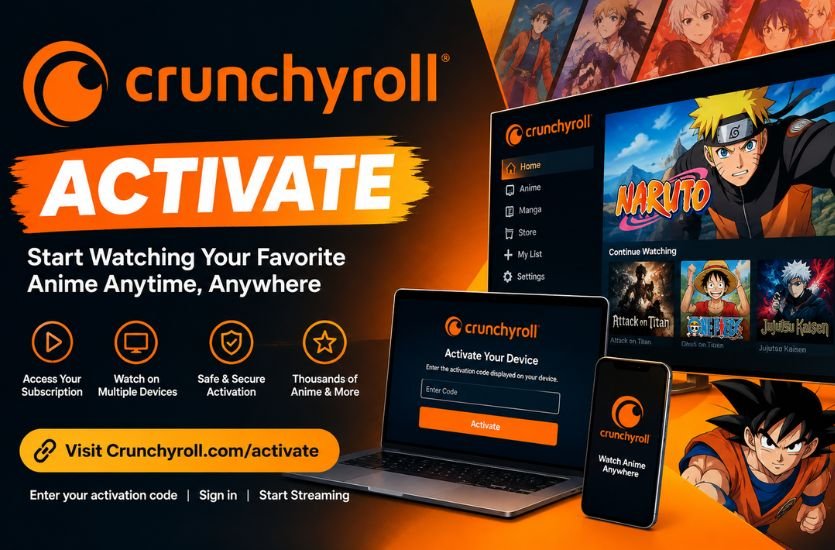
To activate Crunchyroll, open the Crunchyroll application on a supported TV, streaming device, or gaming console and choose the option to activate or log in with a code. A six-character activation code will appear on the screen. On another device such as a phone or computer, open the official Crunchyroll activation page and enter the displayed code. After the code is accepted, the compatible device is connected to the Crunchyroll account and can be used for streaming.
What Is Crunchyroll Activate?
Crunchyroll Activate refers to the process of linking a compatible device to a user’s Crunchyroll account through an activation code. It is particularly useful when the Crunchyroll application is installed on a television or gaming console and the user does not want to enter account credentials using a remote control or game controller.
When the activation option is selected, Crunchyroll generates a six-character alphanumeric code. The user then enters that code through the official activation page using a phone or computer. Once the code is successfully processed, the device is associated with the account and the user can begin using Crunchyroll.
The current Crunchyroll activation system supports several major platforms, including PlayStation, Xbox, Android TV, Google TV, Amazon Fire TV, Apple TV, Samsung TV, LG TV, and Nintendo Switch. Crunchyroll also offers its service on other supported streaming platforms and mobile devices, although the exact login method can vary by platform.
How to Activate Crunchyroll With an Activation Code
The Crunchyroll Activate process is designed to be simple, but users should make sure their application is installed and their device has a working internet connection before beginning.
Start by opening the Crunchyroll application on the television, streaming device, or gaming console. From the sign-in screen, look for an option such as “Activate with Code” or “Log in with Code.” The exact wording can vary depending on the device and version of the application.
After selecting the code-based activation option, a six-character activation code should appear on the screen. Keep this screen available while completing the next step because the displayed code is needed to connect the device.
Using a phone or computer, open the official Crunchyroll activation page. Enter the six-character code exactly as it appears on the television or other device. Once the code is accepted, the device should be connected to the user’s Crunchyroll account and ready for streaming. Crunchyroll describes the process as a three-step activation procedure: obtain the code, enter it on the activation page, and complete the sign-in process.
How to Activate Crunchyroll on a Smart TV
Activating Crunchyroll on a smart TV generally follows the same basic process. First, install and open the Crunchyroll application on the compatible television. After opening the application, select the appropriate login option and look for the code-based activation method.
A six-character code should appear on the TV screen. Use a separate phone or computer to access the Crunchyroll activation page and enter the code. Once the activation is completed, the television should recognize the account and allow the user to access the available Crunchyroll content.
Samsung and LG televisions are among the platforms currently listed by Crunchyroll as supporting the activation-code method. Android TV and Google TV are also included among the supported platforms.
How to Activate Crunchyroll on Fire TV
Amazon Fire TV users can activate Crunchyroll directly through the application. After installing the Crunchyroll app, open it and select the login option.
Crunchyroll currently provides multiple login methods on Fire TV, including QR-code login, code-based login, and email-and-password login. For code-based activation, users select “Log in” followed by “Log in with Code.” The activation code can then be entered through the official Crunchyroll activation page.
QR-code login can be particularly convenient because it avoids manually entering the activation code. However, availability of particular login options can depend on the application version and device.
How to Activate Crunchyroll on PlayStation and Xbox
Crunchyroll supports activation on major gaming consoles, including PlayStation and Xbox. On a compatible console, users can open the Crunchyroll application and choose the available login or activation method.
The code-based method works by displaying a six-character code that can then be entered through the activation page. Crunchyroll also provides QR-code sign-in on supported versions of its application for devices such as Xbox, PS5, and PS4.
For gamers, QR-code sign-in can be more convenient than entering account credentials with a controller. After scanning the displayed QR code with a phone, the user can follow the instructions to confirm the login.
Crunchyroll QR Code Login Explained
The QR-code method is another way to connect a device to a Crunchyroll account. Instead of manually typing a six-character activation code, the user scans a QR code displayed by the Crunchyroll application.
According to Crunchyroll’s current help information, QR-code sign-in is supported on certain application versions for Xbox, PS5, PS4, Android, Android TV, and Fire TV. The exact supported version can change as the application is updated.
The process is straightforward. Open the Crunchyroll application on the compatible device and select the login option. If QR-code login is available, a QR code will appear on the screen. Scan it using a mobile device. If the Crunchyroll application is installed on the phone, it can guide the user through the confirmation process. Otherwise, the QR code can open a web-based sign-in process.
QR-code login is especially useful when users find it difficult to type information with a television remote or gaming controller.
Crunchyroll Activation Code Not Working
One of the most common problems users encounter is an activation code that does not work. There are several possible reasons for this issue.
First, check whether the code has been entered correctly. Crunchyroll’s activation page expects a six-character alphanumeric code. Even a small typing mistake can prevent the device from being connected successfully.
Next, check the internet connection on the device. Crunchyroll specifically recommends making sure the device is connected to the internet when troubleshooting activation problems. Without a stable connection, the application may not be able to generate or process the activation information correctly.
It is also important to make sure the Crunchyroll application is updated. An outdated application can sometimes cause login or activation problems, so installing the latest available version is an important troubleshooting step recommended by Crunchyroll.
If the displayed code is no longer accepted, return to the Crunchyroll application and start the activation process again so that a new code can be generated. Then enter the new code through the activation page.
Why Is Crunchyroll Not Activating on My TV?
If Crunchyroll does not activate on a television, the issue may not necessarily be with the account. The application, internet connection, device software, or activation code may be responsible.
Start by closing and reopening the Crunchyroll application. If the problem continues, check the television’s internet connection and make sure other applications can connect normally.
The next step is to check whether a newer version of the Crunchyroll application is available. Updating the application can resolve compatibility problems and ensure that the device is using the current login and activation features.
If the code still does not work, restart the activation process and use the newly displayed code. Entering an older code instead of the current code shown on the television can prevent successful activation.
Can Crunchyroll Be Activated on Multiple Devices?
Crunchyroll allows users to activate the service on multiple compatible devices. However, activation of multiple devices should not be confused with simultaneous streaming. The number of devices that can stream at the same time depends on the user’s subscription plan.
This means someone may connect Crunchyroll to more than one supported device, such as a television, phone, tablet, or gaming console, while the number of simultaneous streams can still be limited according to the membership.
Users who have devices they no longer use can manage their connected devices through their Crunchyroll account settings.
How to Deactivate a Crunchyroll Device
Sometimes users need to remove an old television, console, or other device from their account. Crunchyroll provides a Device Management section for this purpose.
Users can sign in to their Crunchyroll account, open the settings area, and access device management. From there, a connected device can be selected and deactivated. Crunchyroll also provides an option to deactivate all connected devices when necessary.
Deactivating old devices can be useful when a television has been replaced, a console has been sold, or a user wants to review which devices remain connected to the account.
Is Crunchyroll Activate the Same as Creating an Account?
No. Activating a device and creating a Crunchyroll account are two different processes.
Creating an account establishes the user’s Crunchyroll profile and login credentials. Activating a device connects an existing account to a compatible television, streaming device, or gaming console.
A user who already has a Crunchyroll account can use the activation-code method to connect a supported device. If someone does not yet have an account, they may need to create one before completing the device setup.
Do You Need Premium to Activate Crunchyroll?
Device activation and subscription status are separate considerations. The activation process is primarily about connecting a device to a Crunchyroll account.
The content and features available after signing in can depend on the user’s account and membership. Crunchyroll currently offers different membership tiers, with benefits such as ad-free viewing, expanded simultaneous streaming, offline viewing, and other features varying by plan.
Therefore, successfully activating the application does not mean that every Premium feature is automatically available. The features accessible to the user depend on the account and subscription associated with the activated device.
Tips for a Smooth Crunchyroll Activation
A few simple precautions can make the activation process easier. Before beginning, make sure the Crunchyroll application is installed and updated on the device. Confirm that the device has an active internet connection and that the activation screen is displaying a current six-character code.
When entering the code, carefully match every character shown on the television or device. If the activation does not complete, restart the process rather than repeatedly entering a code that may no longer be valid.
Users should also make sure they are signing in with the correct Crunchyroll account. Activating a device while using a different account can make it appear as though the activation was successful but the expected membership or viewing history is missing.
Final Thoughts on Crunchyroll Activate
The Crunchyroll Activate process provides a convenient way to connect supported televisions, streaming devices, and gaming consoles to a Crunchyroll account. Instead of entering an email address and password with a remote or controller, users can use a six-character activation code from another device.
The basic process involves opening Crunchyroll on the supported device, selecting the code-based activation option, obtaining the six-character code, and entering it through the official activation page. Crunchyroll also supports QR-code sign-in on several compatible devices and application versions, providing an alternative for users who prefer a faster login method.
When activation fails, checking the internet connection, updating the Crunchyroll application, verifying the six-character code, and restarting the activation process are sensible first steps. With the correct account and a supported device, the activation process should allow users to move quickly from the login screen to their anime library.