









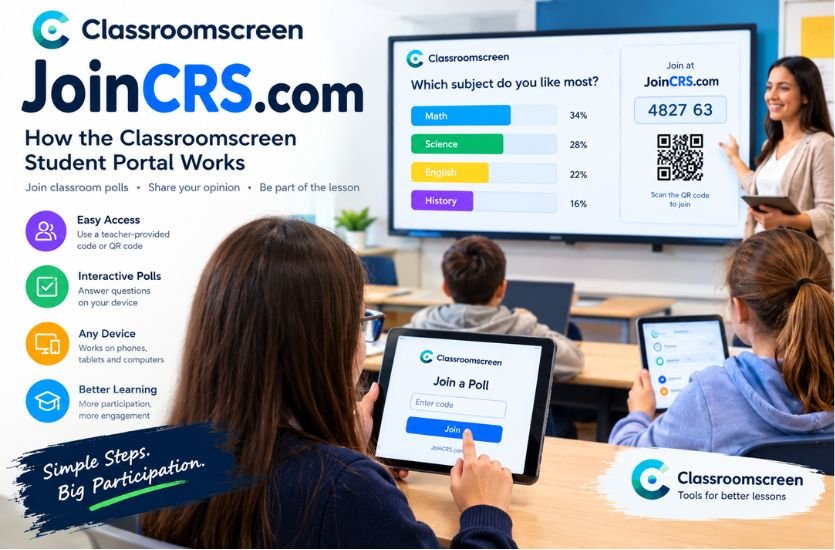
JoinCRS com is a web-based joining portal associated with Classroomscreen, an educational platform designed to help teachers create interactive and organized learning environments. Students can use the service to participate in classroom polls through their own devices by entering a code provided by their teacher. The platform makes classroom interaction more convenient by allowing learners to respond to questions without needing to navigate the teacher’s entire workspace.
Digital learning tools have become increasingly important in modern education because they help teachers communicate with students, collect feedback, and encourage active participation. JoinCRS com supports this approach by providing a straightforward way for students to access supported classroom activities, particularly remote polls.
Quick Answer: What Is JoinCRS com?
| Detail | Information |
|---|---|
| Website name | JoinCRS com |
| Associated platform | Classroomscreen |
| Main purpose | Joining classroom polls and interactive activities |
| Intended users | Students and classroom participants |
| Access method | Teacher-provided code or QR code |
| Platform type | Web-based educational tool |
| Primary benefit | Simple participation in classroom activities |
JoinCRS com is best understood as a joining point within the Classroomscreen ecosystem rather than a standalone online school or complete learning management system. Its documented purpose includes helping students access remotely enabled polls created by their teachers.
What Is JoinCRS com and Why Is It Used?
JoinCRS com is associated with Classroomscreen, a digital classroom platform that provides tools for organizing lessons and encouraging student engagement. Teachers can use Classroomscreen to display instructions, manage classroom activities, and collect responses through interactive features.
The joining portal serves a specific purpose within this environment. When a teacher creates a poll and enables remote voting, students can access the question using a joining code displayed on the teacher’s screen. They can then submit their responses from their own devices.
This approach can be useful in traditional classrooms, computer laboratories, remote lessons, and hybrid learning environments. Rather than asking every student to respond verbally, teachers can collect answers digitally and use the results to guide classroom discussions.
It is important to understand that the joining portal does not independently provide a library of courses or lessons. Students generally need instructions from their teacher to identify the relevant activity and obtain the correct code.
How Does JoinCRS com Work?
The JoinCRS com process is designed to make participation straightforward. The teacher prepares an activity through Classroomscreen, and students use the information displayed on the teacher’s screen to join it.
Preparing a Classroom Poll
The process begins when a teacher creates a poll in Classroomscreen. The teacher selects a question format, enters the question, and configures the available answer options where applicable.
The official Poll widget supports multiple-choice questions, smiley-based responses, and true-or-false questions. These formats allow teachers to adapt activities to different subjects, age groups, and learning objectives.
Enabling Remote Participation
After preparing the poll, the teacher must enable remote voting in the relevant settings. Classroomscreen’s documentation explains that remote voting is available with its Basic and Pro accounts.
When remote participation is enabled, instructions appear on the teacher’s screen. These instructions tell students how to access the question using JoinCRS com and the displayed code.
Entering the Joining Code
Students open the joining page on a compatible device and enter the code shown by their teacher. They should check the digits carefully before submitting them because an incorrect code may prevent access to the intended activity.
A QR code may also be available beside the displayed code. Scanning it can provide direct access to the poll, reducing the need to enter the code manually.
Submitting Answers
Once connected, students can respond to the question presented in the poll. Depending on the selected format, they may choose an answer, select a smiley, or indicate whether a statement is true or false.
The responses can help teachers understand students’ opinions, check comprehension, and identify topics that require further explanation. The teacher controls the poll settings, including whether responses are visible and whether voting remains open.
Main Features of JoinCRS com
Simple Code-Based Access
One of the main advantages of JoinCRS com is its code-based joining process. Students do not need to explore a complex dashboard simply to access a particular poll. They can follow their teacher’s instructions and use the displayed code to connect to the activity.
This can save time during lessons, especially when a teacher needs the entire class to participate within a short period.
Interactive Classroom Polls
Classroom polls allow teachers to ask questions and collect responses digitally. Multiple-choice polls can be used for subject reviews, while true-or-false questions can help check basic understanding. Smiley-based polls can be useful for gathering opinions or checking how students feel about an activity.
The usefulness of each format depends on the teacher’s question and the intended learning outcome.
QR-Code Joining
A QR code offers another way to access an activity. Instead of manually entering a code, students can scan the displayed code with a compatible device when that option is available.
This can be particularly convenient in classrooms where students use smartphones or tablets. However, students should follow their school’s device policies and use only the joining information supplied by their teacher.
Responses From Individual Devices
Remote voting allows students to submit answers using their own devices rather than relying entirely on a shared classroom screen. This can create more opportunities for participation, including for students who may be reluctant to answer questions aloud.
Teachers can use the collected responses to identify general understanding and encourage further discussion.
Visual Presentation of Results
The Classroomscreen Poll widget supports different ways of displaying voting results, including bar charts, pie charts, and doughnut charts. These visual formats can help teachers explain response patterns and discuss differences in students’ answers.
Charts are particularly helpful when a teacher wants to compare the popularity of answer choices or introduce a discussion based on the results.
Benefits of JoinCRS com for Students
Encourages Active Participation
Students can contribute to classroom activities directly from their devices. This provides an alternative to traditional question-and-answer sessions and can make lessons more interactive.
Students who prefer responding privately may also find digital polling more comfortable than speaking in front of the entire class.
Makes Joining Activities Easier
A simple joining process reduces the number of steps required to participate in a poll. Students mainly need a working internet connection, a compatible browser, and the code or QR code supplied by their teacher.
The exact requirements may vary depending on the activity and the school’s technical environment.
Supports Different Learning Preferences
Some students respond well to visual information, while others prefer reading questions and selecting answers independently. Interactive polls can provide another way to engage with lesson material.
However, polls should complement other teaching methods rather than replace explanations, discussions, practical exercises, or individual assessments.
Provides Opportunities for Feedback
Students can use polls to express opinions, answer knowledge-check questions, and participate in classroom discussions. Teachers can then use the responses to decide whether to revisit a topic or move forward with the lesson.
Benefits of JoinCRS com for Teachers
Quickly Checks Understanding
Teachers can use classroom polls to determine whether students understand a recently explained concept. If many students select an incorrect answer, the teacher may decide to explain the topic again or provide another example.
This makes polling a useful form of formative assessment, although it does not replace more comprehensive assessments when detailed evidence of learning is needed.
Supports Classroom Discussions
Poll results can introduce discussions in which students explain their choices and consider alternative viewpoints. For example, a teacher might ask a multiple-choice question, display the results, and invite students to explain why they selected particular answers.
This approach can help transform a simple question into a more engaging learning activity.
Works With Online Teaching
Classroomscreen also provides features for organizing remote lessons. Teachers can share their screens through supported video-conferencing platforms and use appropriate widgets to guide students through an activity.
JoinCRS com is particularly relevant when students need to participate in a remotely enabled poll during an online or hybrid lesson.
Saves Time During Lessons
Digital responses can help teachers collect feedback without asking every student to answer individually. This can make short knowledge checks more efficient and leave additional time for explanation, practice, and discussion.
The overall benefit depends on how the teacher incorporates polling into the lesson.
Is JoinCRS com Safe to Use?
JoinCRS com is documented as part of the Classroomscreen service, and the platform provides official documentation about its features and privacy practices. This gives users a clearer basis for identifying the service than relying exclusively on unrelated third-party descriptions.
Nevertheless, students and teachers should remain careful when using any online educational tool. They should verify the website address, follow school guidance, and avoid submitting unnecessary personal information.
Parents and educators working with younger students should also consider the platform’s privacy policy and the school’s rules for using digital learning services. The existence of a privacy policy does not mean that a website collects no information, so users should consult the relevant documentation when they need to understand how data is handled.
Students should use the code supplied by their teacher rather than attempting to join unknown sessions. If a page unexpectedly requests unrelated personal information, they should stop and ask their teacher or school administrator for guidance.
Common JoinCRS com Problems and Solutions
Incorrect or Invalid Code
A joining code may not work if it has been entered incorrectly or does not correspond to the intended activity. Students should carefully recheck the code and ask the teacher to confirm that it is correct.
The Poll Is Not Available
Students may be unable to participate if the teacher has not enabled remote voting or the relevant poll is no longer accepting responses. In this situation, the teacher should check the activity settings and confirm that voting is open.
Website Loading Problems
A slow internet connection, browser issue, or school network restriction may prevent the joining page or related features from loading properly. Students can check their connection, refresh the page, or try another supported browser.
If the problem continues on a school network, the school’s technical support team may need to investigate whether network filtering is blocking required Classroomscreen services.
QR-Code Scanning Issues
If scanning the QR code does not open the activity, students should check that their device camera or QR-scanning feature is working correctly. They can also ask the teacher to display the joining code so they can enter it manually.
Confusion About Account Requirements
Students should not assume that they need to create a separate teacher account simply to participate in a remote poll. The joining process is different from creating or managing a Classroomscreen teacher account.
If the page requests an unexpected sign-in, students should verify that they are following the correct instructions for their particular activity.
Is JoinCRS com a Complete Learning Management System?
JoinCRS com should not be confused with a comprehensive learning management system. Its documented role is to help participants join supported Classroomscreen activities, particularly remote polls.
A full learning management system typically provides a wider range of functions, such as course organization, assignment submission, grade management, and structured learning materials. Those functions go beyond the main purpose of the JoinCRS joining page.
Classroomscreen itself offers a broader collection of classroom tools, but the specific features available to users depend on the platform, account type, and activity being used.
Understanding this distinction helps students and educators develop realistic expectations about what the joining portal can do.
The Role of JoinCRS com in Modern Education
Digital tools continue to influence how teachers organize lessons and interact with students. Interactive classroom platforms can support participation by giving learners more opportunities to respond, share opinions, and demonstrate their understanding.
JoinCRS com contributes to this process by providing a straightforward way to join supported classroom polls. Its code-based access and QR-code option can make participation easier, while the wider Classroomscreen platform offers teachers tools for presenting information and managing activities.
However, technology alone does not guarantee better learning outcomes. The effectiveness of classroom polling depends on the quality of the questions, the teacher’s instructional approach, and how the responses are used to guide learning.
When used thoughtfully, interactive polls can complement established teaching methods and help create a more participatory classroom environment.
Final Thoughts
JoinCRS com is a joining portal associated with Classroomscreen that allows students to participate in remotely enabled classroom polls using a teacher-provided code or QR code. Its main purpose is to simplify access to interactive activities rather than provide independent courses or a complete educational management system.
Students can use it to submit answers, while teachers can gather feedback and use poll results to guide classroom discussions. Understanding the joining process, checking codes carefully, and following appropriate privacy practices can help users make better use of the platform.
For students, teachers, and parents researching JoinCRS com, the most useful approach is to distinguish its specific joining function from the wider tools offered by Classroomscreen.
If you want more informative articles with different categories, visit Expand Magazine.