







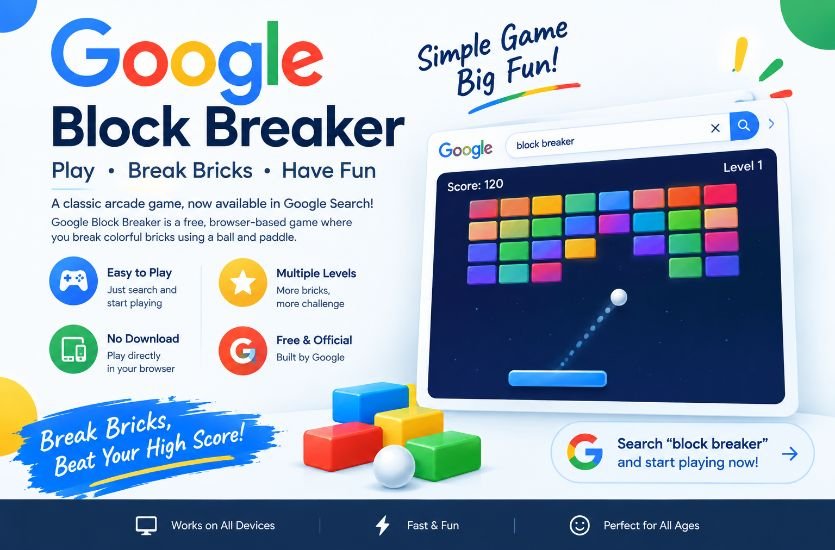
Google Block Breaker is a simple but entertaining browser game that brings the classic brick-breaking arcade experience directly into Google Search. Instead of downloading an application or installing additional software, users can search for Block Breaker and, when the interactive game is available, start playing from the search results. The basic objective is familiar: control a paddle, keep a bouncing ball in play, and use it to destroy blocks before losing all available lives.
The game has attracted attention because it combines an old-school arcade concept with the convenience of modern web search. Its gameplay is easy to understand, but keeping the ball under control becomes increasingly challenging as the game progresses. Google Block Breaker is also frequently discussed alongside Google’s older Atari Breakout Easter egg, although the two experiences should not be treated as exactly the same game.
Also Read: GrammarVista.com USA: American English Guide
What Is Google Block Breaker?
Google Block Breaker is a browser-based brick-breaking game associated with Google Search. It follows the traditional Breakout-style formula in which a player moves a horizontal paddle at the bottom of the screen and uses it to bounce a ball toward a collection of blocks.
Whenever the ball strikes a breakable block, the block is removed or affected depending on the particular implementation. The player continues controlling the paddle while attempting to prevent the ball from passing below it. Missing the ball can cost a life, making positioning and timing the central skills required to play successfully.
One of the main attractions of Google Block Breaker is its accessibility. Players do not generally need a dedicated installation, complicated setup process, or separate gaming account to try the Search-based experience. The game is designed as a quick browser activity that can be played during a short break or for a longer session.
How to Play Google Block Breaker
Playing Google Block Breaker is relatively straightforward. Open Google Search and enter a query such as “Block Breaker” or “Brick Breaker.” When the interactive game card is available for the search, the player can select the play option and begin the game. Current guides report that the game can be accessed from desktop and mobile devices, although the exact appearance and availability may vary by search environment.
Once the game begins, the paddle appears near the bottom of the playing area while the ball moves around the screen. The player’s responsibility is to move the paddle into the path of the ball. The ball then rebounds from the paddle and travels back toward the blocks.
The main objective is to destroy the blocks without allowing the ball to fall past the paddle. As more blocks disappear and the game becomes faster or more demanding, the player needs quicker reactions and better anticipation.
Google Block Breaker Controls
The controls can vary depending on the device and version of the game experience. Desktop players may be able to move the paddle using the keyboard, while mouse-based movement can also be supported. Several guides specifically mention the left and right arrow keys or the A and D keys for desktop play.
On smartphones and tablets, the game can use touch-based movement. Players can generally press, hold, or swipe across the playing area to move the paddle horizontally.
The important principle is the same regardless of the control method: the paddle must be positioned underneath the ball before it reaches the bottom of the playing field.
The Basic Gameplay Mechanics
Google Block Breaker is based on a remarkably simple gameplay loop. The ball travels around the play area, collides with blocks and surfaces, and changes direction after collisions. The paddle provides the player with control over the ball’s continued movement.
The blocks form the primary target. Destroying them gradually opens more space on the screen and allows the player to progress. Missing the ball is the main danger because the player cannot continue indefinitely without losing lives.
This design is one reason brick-breaking games remain popular decades after the original arcade versions appeared. There are only a few fundamental actions to understand, but the combination of speed, angles, timing, and positioning can make the game surprisingly challenging.
Is Google Block Breaker the Same as Atari Breakout?
Google Block Breaker is strongly connected to the history of Breakout-style games, but it should not automatically be described as the same game as Atari Breakout.
Atari’s Breakout was released in 1976 and established the famous paddle, ball, and brick formula. Google later created an Atari Breakout-inspired Easter egg in Google Images. That older experience became particularly well known because searching for “Atari Breakout” in Google Images could transform the image results into a playable brick-breaking game.
The older Google Images experience and the newer Search-based Block Breaker share the same basic arcade concept, but they were different implementations. This distinction is important because many websites use the terms interchangeably.
Google Block Breaker and the 2013 Google Images Easter Egg
Google’s older Atari Breakout Easter egg is an important part of the history behind searches for Google Block Breaker.
In 2013, Google Images gained a hidden Breakout-style feature. When users searched for the appropriate Atari Breakout query, the image thumbnails could be transformed into blocks in a playable game. Instead of simply looking at image results, users could interact with the page as though it were an arcade game.
That experience became one of Google’s better-known gaming Easter eggs. Later changes to Google Images affected the original experience, and current articles commonly describe it as an older Easter egg rather than the same Search game available today.
This historical connection explains why people searching for Google Block Breaker may encounter information about Atari Breakout. Both experiences use the same broad brick-breaking concept, but the Google Search game should be discussed separately from the older Google Images Easter egg.
When Did Google Block Breaker Appear?
Current online sources generally place the newer Google Search Block Breaker in January 2025. Several technology and gaming articles published around that period describe a Block Breaker game appearing directly within Google Search results.
There is some inconsistency among websites about the exact history and terminology surrounding the game. Some sources describe the 2025 version as a new Google Search game, while others connect it directly to the older 2013 Easter egg. For an accurate article, it is better to describe 2013 and 2025 as separate Google-related brick-breaking experiences rather than claiming they are literally one unchanged game.
Why Google Block Breaker Became Popular
The biggest advantage of Google Block Breaker is convenience. Traditional games often require an installation, account, download, or dedicated application. A Search-based game removes much of that friction.
The nostalgic gameplay is another major factor. Many people recognize the paddle-and-ball concept immediately because it has been used by Breakout, Arkanoid, and countless browser and mobile games.
The short-session format also makes the game suitable for casual players. Someone can play for a few minutes without committing to a long gaming session. The basic rules can be understood almost immediately, making the game accessible even to people who do not normally play video games.
Google Block Breaker on Desktop
Desktop computers provide several possible control methods depending on the implementation and browser environment. Keyboard controls can make the paddle easier to move precisely, while mouse movement can provide a more direct relationship between the player’s hand and the paddle.
Desktop play can also provide a larger viewing area, making it easier to follow the ball’s movement. This can be especially useful once the game becomes faster.
Players should avoid making unnecessarily large movements. Small and controlled paddle movements can make it easier to maintain a stable position and react when the ball changes direction.
Google Block Breaker on Mobile
Mobile devices make the game convenient because players can access browser-based gameplay without needing a dedicated gaming setup. Current guides report touch-based controls for smartphones and tablets.
The smaller screen can make the game slightly different from desktop play. Players need to maintain a clear view of the ball while moving the paddle with a finger.
Small movements are often easier to control than repeatedly dragging the paddle from one side of the screen to the other. A player who watches the ball carefully can begin anticipating where it will reach the bottom rather than simply reacting at the last moment.
Power-Ups and Special Features
Some online guides describe power-ups and special gameplay elements associated with Google Block Breaker, including wider paddles, additional balls, slower ball movement, laser-style attacks, and other effects.
However, this is an area where readers should be careful. Numerous independent Block Breaker websites use the Google Block Breaker name while providing their own HTML5 games. Some of these unofficial games advertise features such as 150 levels, special block types, or additional mechanics that should not automatically be attributed to Google’s Search version.
Therefore, when discussing specific power-ups, it is safer to describe them as features reported by particular versions or implementations unless the feature can be confirmed in the Google Search game itself.
Why There Is Confusion About Google Block Breaker
Searching for Google Block Breaker can produce many different websites. Some are informational articles, some are recreations of classic Breakout games, and some are independent projects that use similar branding.
This creates confusion about features, level counts, controls, release dates, and even whether a particular game is officially operated by Google.
For example, one independent Block Breaker website openly describes itself as an unofficial HTML5 project and says that it is not affiliated with Google. Its advertised features therefore cannot automatically be treated as specifications of Google’s Search game.
A useful rule is to identify where the game is actually running. A game appearing directly inside Google Search is different from an independent website that happens to use “Google Block Breaker” in its title.
Google Block Breaker Not Showing Up: Quick Answer
One of the most common problems is searching for Block Breaker and not seeing the expected interactive game.
The first solution is to try a slightly different search query such as “Block Breaker” or “Brick Breaker.” Then refresh the search page and try another modern browser or device. Browser extensions, temporary loading problems, regional differences, language settings, and changes to Google’s Search interface can affect whether an interactive feature appears.
If the game still does not appear, the problem does not necessarily mean that the device is broken. Google Search features can change, and third-party articles may describe a version or availability that does not match what every user currently sees.
Tips for Playing Google Block Breaker Better
Successful play is mainly about controlling the paddle rather than constantly moving it. Watch the ball’s trajectory and position the paddle where the ball is expected to arrive.
Players should also learn to anticipate rebounds. When the ball hits a wall or block, its direction changes. Watching these movements carefully gives the player more time to prepare for the next return.
Another useful approach is to avoid panic when the ball moves quickly. Large, sudden paddle movements can make it easier to miss the ball. Controlled movements can provide greater precision.
When special features or power-ups are present, players should consider whether collecting them is worth the risk. Chasing a bonus that takes the paddle away from the ball can sometimes create a bigger problem than the reward solves.
Does Google Block Breaker Require a Download?
The Google Search version is designed as a browser-based experience, so players do not normally need to download a separate application to start it. Current guides describe the game as playable directly through Google Search.
This is different from independent Block Breaker websites, which may offer downloadable versions, advertisements, additional game modes, or their own software. Users should check the identity of a website before downloading anything that claims to be an official Google game.
Is Google Block Breaker Free?
The Search-based game is generally described by current guides as free to play. The major attraction is that users can access the game through a browser without purchasing a traditional game license.
However, independent websites using the Block Breaker name can have different business models and features. The fact that an unofficial game is free does not make it an official Google product.
Is Google Block Breaker Safe?
The safest approach is to use the game directly through the Google Search experience rather than downloading unknown software from websites claiming to offer an official version.
A browser-based Search game does not normally require users to install an unfamiliar executable file. If a website claiming to provide “Google Block Breaker” asks users to download suspicious software, install an extension, or provide unnecessary personal information, users should be cautious.
The distinction between Google’s Search feature and independent clones is particularly important for security-conscious users.
Google Block Breaker vs. Other Browser Games
Google Block Breaker belongs to a large family of browser-based arcade games. Its closest relatives are classic Breakout-style games in which the player controls a paddle and uses a ball to destroy blocks.
The formula has survived because it does not require complicated instructions. The player immediately understands the objective, but achieving consistent results requires practice.
Google’s contribution is primarily the convenience of placing this style of game within the search experience. Instead of visiting a dedicated gaming platform, users can potentially reach the game while searching for it.
Why the Game Is Still Interesting
The appeal of Google Block Breaker is not based on complicated graphics or a huge storyline. Its strength is simplicity.
The game combines nostalgia with instant accessibility. Someone familiar with classic arcade games can understand it within seconds, while someone who has never played Breakout can learn the basic mechanics almost immediately.
It also demonstrates how search engines can become more interactive. Google Search is traditionally associated with finding information, but features such as games and interactive experiences turn the search page into something more dynamic.
Common Questions About Google Block Breaker
What is Google Block Breaker?
Google Block Breaker is a browser-based brick-breaking game associated with Google Search. Players control a paddle, bounce a ball, and destroy blocks.
How do you start Google Block Breaker?
Search for “Block Breaker” or “Brick Breaker” on Google and look for the interactive game feature when it is available.
Is Google Block Breaker the same as Atari Breakout?
No. They use similar gameplay mechanics, but Google’s older Atari Breakout Easter egg and the newer Block Breaker Search experience are separate implementations.
Can you play Google Block Breaker on a phone?
Current guides report mobile support through touch-based controls, although availability and controls can vary depending on the Search environment.
Do you need to download Google Block Breaker?
The Google Search version is browser-based, so a separate game download is generally unnecessary.
Why can’t I find Google Block Breaker?
The interactive feature may not appear for every search, browser, language setting, region, or Search interface. Trying another query, refreshing the page, or using another browser can help determine whether the issue is temporary.
Are all Google Block Breaker websites official?
No. Some independent websites explicitly identify their Block Breaker games as unofficial projects. Their advertised levels and features should not automatically be attributed to Google.
Final Thoughts
Google Block Breaker combines one of gaming’s simplest formulas with the convenience of modern web search. Its paddle-and-ball gameplay is easy to learn, while the need for accurate timing and positioning gives the experience enough challenge to remain engaging.
The game’s history is also worth understanding. Google’s older Atari Breakout Easter egg helped establish the company’s reputation for hiding playful experiences inside Search and other products. The newer Block Breaker experience continues that general tradition while making the brick-breaking concept accessible through a modern browser interface.
At the same time, readers should be careful when researching the game online. Numerous unofficial Block Breaker websites use similar names and may introduce their own levels, power-ups, graphics, and gameplay mechanics. Keeping the official Google Search experience separate from third-party recreations makes it easier to understand what Google Block Breaker actually is.
For anyone looking for a quick arcade-style game without a complicated installation process, Google Block Breaker offers a simple combination of nostalgia, accessibility, and fast-paced gameplay.
Visit: Expand Magazine for more informational content.