








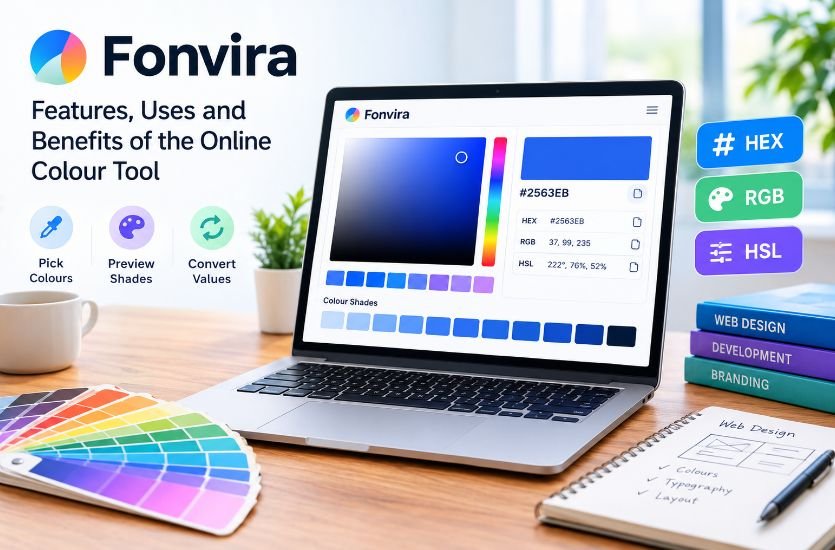
Fonvira is a free, browser-based colour picker and conversion tool designed to simplify everyday colour-related tasks for web designers, developers and digital creators. It allows users to select colours, preview shades and obtain colour values in formats such as HEX, RGB and HSL. Instead of installing dedicated software or manually converting colour codes, users can access the tool through a web browser and quickly retrieve the values needed for their projects.
Colour selection is an important part of creating consistent digital experiences. From website backgrounds and navigation buttons to branding elements and interactive interfaces, the right colours influence visual presentation and readability. Fonvira focuses on making this process more convenient by bringing colour selection and conversion into a straightforward online workflow.
Quick Answer: What Is Fonvira?
| Detail | Information |
|---|---|
| Name | Fonvira |
| Tool type | Online colour picker and converter |
| Primary purpose | Selecting colours and converting colour values |
| Supported formats | HEX, RGB and HSL |
| Accessibility | Browser-based access |
| Cost | Free, according to its official website |
| Account requirement | No mandatory registration for the basic tool |
| Target users | Designers, developers, students and digital creators |
| Main benefit | Quick colour selection, previewing and conversion |
What Is Fonvira and How Does It Work?
Fonvira is an online utility that helps users identify colours and obtain their corresponding numerical representations. Its main purpose is to reduce the time required to move between visual colour choices and the technical values used in web development and digital design.
The tool provides a colour selection interface where users can choose a shade or enter a HEX colour code. It then displays corresponding values in other supported formats, allowing users to copy the information for use in a stylesheet, design application or compatible development environment.
For example, a web designer working with a particular shade of blue might need its RGB representation for a coding task. Rather than calculating the conversion manually, the designer can use Fonvira to retrieve the corresponding values. This approach helps simplify routine tasks and reduces the possibility of transcription mistakes.
Fonvira is designed for focused colour-related work rather than complete website creation or advanced graphic editing. Its relatively simple purpose makes it useful when someone needs a colour value without opening a larger design application.
Read HRMTaila: Meaning, Features, and AI in HR Management
Main Features of Fonvira
1. Online Colour Picker
The colour picker allows users to select shades visually instead of relying entirely on numerical codes. This can be useful when experimenting with different backgrounds, borders, buttons and decorative elements.
A visual selection process also helps beginners understand how small adjustments can change the appearance of a design. Once a suitable shade has been identified, its corresponding values can be used elsewhere in the project.
2. HEX, RGB and HSL Conversion
One of Fonvira’s central functions is converting colour information into commonly used formats. HEX, RGB and HSL describe colours through different numerical systems, and each format can be useful in different design or development situations.
HEX codes are widely used in CSS and design specifications. RGB represents the red, green and blue components of a colour, while HSL describes hue, saturation and lightness.
Having these representations available together makes it easier to transfer a colour between tools and workflows without repeatedly calculating its values.
3. Live Colour Preview
Fonvira provides a live preview that allows users to see the selected shade while working with its numerical values. This visual feedback can help users confirm that they have selected the intended colour before copying it into another application.
However, a preview cannot guarantee that a colour will appear identical on every screen. Display settings, surrounding colours, brightness and other visual factors can affect how a shade is perceived.
For this reason, designers should always review their chosen colours within the actual website or interface where they will appear.
4. Convenient Colour-Code Copying
Manually copying long numerical values can introduce mistakes, particularly when a project contains several similar shades. Fonvira includes copy controls that make transferring colour values more convenient.
This functionality can be helpful during routine website development, when a developer needs to move between a design reference and a stylesheet. It also makes the tool accessible to users who are unfamiliar with manual colour conversion.
5. Browser-Based Access
Fonvira works through a web browser, eliminating the need to install a separate desktop application for basic colour selection and conversion.
This approach is convenient for people who use different computers or prefer lightweight online utilities. The official website also describes the tool as accessible through desktop and mobile browsers.
Actual usability may vary depending on the device, browser and available internet connection.
6. Free Use Without Mandatory Registration
Fonvira describes its basic colour utility as free to use without mandatory account creation or software installation. Its published terms also permit personal and commercial use, subject to the stated conditions.
This makes it an accessible option for students, freelancers, website owners and small businesses that need straightforward colour conversion without purchasing a specialised design application.
Understanding HEX, RGB and HSL Colour Formats
To understand why Fonvira can be useful, it helps to know how its supported colour formats work.
HEX Colour Codes
HEX is short for hexadecimal. In common web design, a six-digit HEX code represents the red, green and blue components of a colour using numbers and letters. For example, #2563EB represents a shade of blue.
HEX codes are popular because they are compact and easy to include in CSS files, design specifications and brand guidelines. They also provide a convenient way to record a precise colour for later reuse.
RGB Colour Values
RGB stands for red, green and blue. In the commonly used eight-bit format, each component has a value between 0 and 255. The same blue represented by #2563EB can be written as rgb(37, 99, 235).
This format is useful in programming environments and graphics operations that work directly with colour channels. CSS also supports RGB notation with an alpha component for controlling transparency, although this should not be confused with a separate Fonvira feature.
HSL Colour Values
HSL stands for hue, saturation and lightness. Hue represents the general colour, saturation describes its intensity, and lightness indicates how light or dark it is.
HSL can be easier to work with when creating variations of an existing shade. For example, a developer might adjust lightness to prepare different button states while retaining a similar hue.
These three formats provide different ways to represent colours. Fonvira helps users obtain the values they need without having to calculate each representation independently.
How Fonvira Can Help Web Designers and Developers
Maintaining Consistent Website Colours
Consistency matters when a website uses the same brand colours across its header, navigation, buttons, links and footer. Slight differences between colour values can make a design appear less coordinated.
Fonvira can help designers retrieve colour codes for reuse across different elements. For larger projects, these values should also be stored in a central design system or CSS custom properties so that the same approved colours can be applied consistently.
Simplifying Design-to-Development Handoffs
Designers often share colour specifications with developers during website production. If a designer supplies a HEX value but the development task requires RGB, a conversion tool can make the handoff easier.
Fonvira provides a practical way to obtain alternative representations and transfer them into the appropriate environment. This can reduce unnecessary interruptions during collaborative work.
Supporting Small Business Branding
Small businesses frequently reuse their brand colours across websites, promotional graphics, landing pages and digital marketing materials. Recording the exact values helps maintain a recognisable visual identity.
Fonvira can support this process by making colour values easier to retrieve. However, establishing a complete brand identity still requires decisions about typography, imagery, layouts and the overall visual direction.
Helping Students Learn Web Development
Beginners learning HTML and CSS may encounter several colour formats before understanding how they relate to one another. Seeing a selected shade represented in HEX, RGB and HSL can make these concepts easier to explore.
The tool can complement practical coding exercises, particularly when students are experimenting with backgrounds, text colours and interface elements.
Is Fonvira Useful for Mobile and Desktop Users?
Fonvira’s browser-based approach makes it suitable for people who want to access a colour utility without installing additional software. Desktop users may find it convenient while working with code editors, website builders or graphic design applications.
Mobile users can also access browser-based colour tools when checking a colour value or working on a smaller digital task. The overall experience depends on the device’s screen size and browser interface.
Although mobile access can be convenient, more complex design projects may still be easier to manage on a desktop computer, where users can view multiple applications and compare colour combinations more comfortably.
Fonvira Privacy and Data Considerations
Privacy is an important consideration when using online utilities. According to Fonvira’s published information, its colour-processing functionality operates locally within the browser, meaning the colour values entered for conversion are not sent to its servers for that purpose.
The service also states that it does not require users to register to access its basic functionality. These characteristics can make routine colour conversion straightforward without requiring users to submit personal account information.
Nevertheless, local colour processing should not be interpreted as proof that visiting the website creates no network activity. Websites may still make requests for fonts, hosting infrastructure, security services or other supporting resources.
Users working under strict privacy requirements should review the current privacy policy and determine whether the service’s disclosed practices meet their needs. The published policy is a statement of the operator’s practices rather than an independent technical audit.
Limitations of Fonvira
Fonvira is best understood as a focused colour picker and conversion utility. Its advertised core functions do not establish that it provides every feature available in professional design software.
For example, users who require extensive palette management, shared team libraries, advanced colour-space workflows or integrated design collaboration may need additional applications.
Colour conversion also does not automatically make a design accessible. A colour can be represented accurately in HEX, RGB or HSL and still produce poor readability when used with a particular background. Designers should independently check contrast ratios, especially for text, buttons and important interface controls.
Similarly, a colour preview cannot guarantee consistent appearance across all displays. Testing the final design on relevant devices remains an important part of the development process.
These limitations do not necessarily reduce Fonvira’s usefulness for simple tasks. They clarify the situations in which a lightweight utility is appropriate and when more specialised tools are necessary.
Is Fonvira Worth Using?
Fonvira may be a useful option for anyone who regularly needs to select colours or convert between common web colour formats. Its browser-based access, live preview and copying functionality address a specific requirement without demanding a complicated workflow.
For beginners, it can provide a practical way to explore how colour values work. For experienced developers, it can save time when transferring values between visual references and code.
Its suitability ultimately depends on the task. Basic colour selection and conversion do not require a complete graphic design suite, but professional projects may involve additional needs such as accessibility testing, design-system management and advanced colour control.
Using Fonvira alongside those complementary practices can help users work more efficiently while maintaining consistent visual results.
Frequently Asked Questions
What is Fonvira used for?
Fonvira is an online colour picker and converter used to select colours, preview shades and obtain corresponding HEX, RGB and HSL values for digital design and development tasks.
Is Fonvira free?
The official website describes Fonvira as a free utility without mandatory registration or a paid subscription for its basic colour-selection and conversion functions.
Does Fonvira require installation?
No separate software installation is required for its browser-based functionality. Users can access the tool through a compatible web browser.
Can Fonvira help with website development?
Yes. Its colour values can be used in website styling, CSS and other compatible development workflows. Developers should still test the selected colours in the finished interface.
Does Fonvira replace professional design software?
No. Fonvira focuses on colour selection and conversion. More extensive design, image editing, collaboration and colour-management tasks may require additional tools.
Is a colour selected in Fonvira automatically accessible?
No. Correct colour conversion does not guarantee sufficient contrast or overall accessibility. Users should check text and background combinations with a dedicated contrast checker and test the final interface.
Conclusion
Fonvira offers a straightforward way to select colours, preview shades and convert values between HEX, RGB and HSL formats. Its browser-based design and convenient copying controls can support everyday tasks for website developers, graphic designers, students and digital creators.
Although it does not replace comprehensive design software or accessibility testing, it can simplify a common part of digital work. By combining accurate colour values with consistent design standards and appropriate testing, users can make better-informed choices for their websites and other digital projects.