







Open-plan rooms make family life easier to share, but they can be difficult places to watch a film. A kitchen pendant may shine toward the screen, conversation travels across the whole space, and the best viewing wall might also face the main window. The solution is not necessarily a separate theater. It is a sequence of decisions that makes the picture, furniture, and lighting work with the architecture rather than against it.
Map activities before placing equipment
Start with a floor plan marked for cooking, dining, circulation, and watching. A screen near a busy walkway will be interrupted constantly; one beside the kitchen may compete with bright task lighting. Choose a wall with few doors and a seating arrangement that does not isolate viewers from the rest of the room. Consider how often people watch casually versus settling in for an entire film.
Do not treat a screen as an interchangeable white surface. Gain, texture, viewing cone, and the direction from which light arrives change what viewers see. Some ambient-light-rejecting constructions are designed for particular projector geometries. Check the manufacturer’s compatibility guidance and consider where the main seats are located. A screen that looks excellent from the center can behave differently at the far edge of a wide sofa.
Understand close-to-wall projection
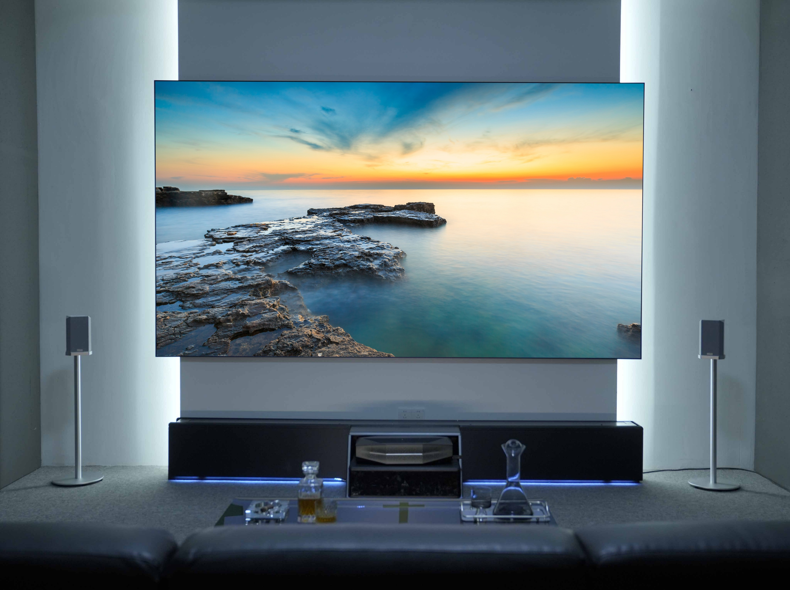
An ultra short throw home theater projector can create a substantial image from near the screen, reducing the need to place a projector behind the sofa. That can be useful in a large shared space with frequent movement. The trade-off is precision: cabinet height, exact distance, and screen flatness become important. Use the published setup chart for the specific device rather than assuming every UST projector fits the same console.
Plan for the boring details: nearby electrical outlets, safe cable paths, access to streaming devices, and ventilation. An elegant concept may become frustrating if a cable crosses a walkway or the remote receiver sits behind an object. Leave a little working space for cleaning and adjustment. If several people use the system, write down which input and picture preset they should choose rather than relying on one expert in the household.
Do not confuse resolution with room suitability
A 4K laser projector may offer excellent detail and modern light-source engineering, but open-plan viewing creates separate demands. Black levels are affected by light reflected from walls and ceilings. Viewers may watch from several angles rather than only the center. A successful system should balance image detail with suitable brightness, screen material, and a layout that works outside a fully darkened room.
Revisit the arrangement from the point of view of guests. Someone standing at the kitchen island may see the image from a far wider angle than the person in the center seat; a child on the floor experiences a different viewing height. Check glare, circulation routes, and whether someone crossing the room will interrupt the picture. A technically impressive system should still work when the room is full of people.
Create lighting zones
Independent circuits or smart lighting scenes can let the kitchen remain usable without bathing the screen in light. Favor local task lamps and shielded fixtures that do not point toward the image. Window coverings may be the most effective change for afternoon viewing. Build a normal evening scene and a daytime scene, then assess the picture under both rather than relying on one glamorous demonstration.
Rehearse the ordinary routine rather than the launch-day demonstration. Imagine arriving home with groceries, turning on a light, finding the remote, and watching twenty minutes of a show. Can the picture be seen, is the system quick to start, and can the equipment remain out of the way afterward? Convenience is a genuine performance characteristic when a room has several purposes.
Work with the furniture, not around it
The screen should relate to sofa height, storage, and the largest object on the wall. A wide console can support the setup, but it should not block the image or push the screen uncomfortably high. In an open-plan room, cables and accessories are visible from more angles, so route them carefully. If a screen retracts, confirm there is space above or below for the housing.
Take the time to calibrate ordinary settings before concluding that a device needs replacing. Extreme sharpening, exaggerated color, or an unsuitable picture mode can make good footage look artificial. Begin with a balanced preset, check focus and geometry, and compare the same material again. If a result still disappoints, identify the exact limitation—contrast, glare, motion, or placement—rather than making an undefined request for a ‘better picture’.
Control sound spill thoughtfully
Open spaces often combine hard surfaces with very little acoustic separation. Speech from a movie can compete with cooking noise, while low frequencies travel into adjacent areas. Rugs, curtains, and soft seating help reduce reflections, although they are not complete soundproofing. Choose sound levels suited to the household and test dialogue clarity from the far seat before adding more volume.
Use representative content for any comparison. A vividly colored demonstration clip makes almost every system look exciting, but it says little about skin tones, shadow detail, subtitles, or fast motion. Watch a familiar dark scene, a bright exterior, and something with camera movement. Keep the lights in the position in which people will normally use the room so the result reflects everyday viewing.
Keep shared living comfortable
A screen that dominates the wall all day may not suit a room whose main purpose is gathering. Think about how people reach the kitchen, whether children have a clear play area, and where remote controls will live. The aim is not to hide every trace of technology. It is to give the display a deliberate place and allow the space to function naturally when nobody is watching.
Do not treat a screen as an interchangeable white surface. Gain, texture, viewing cone, and the direction from which light arrives change what viewers see. Some ambient-light-rejecting constructions are designed for particular projector geometries. Check the manufacturer’s compatibility guidance and consider where the main seats are located. A screen that looks excellent from the center can behave differently at the far edge of a wide sofa.
The decision that lasts beyond opening night
Open-plan home entertainment succeeds when the design handles competing needs without making any of them inconvenient. Begin with traffic patterns and ambient light, choose a projection geometry that fits the space, and then refine the screen, sound, and controls. The reward is not simply a larger picture but a room that feels comfortable before, during, and after movie night.